Your Contact Form 7 form stopped working. Maybe you get a red "There was an error trying to send your message" box. Maybe the form says it worked but nothing lands in your inbox. Maybe the little spinner just turns forever. Every one of those means lost customers, so you want it fixed today.
The good news: Contact Form 7 itself almost never breaks. It has more than 10 million active installs and a long track record. In our experience the cause is nearly always one of three things around it: email delivery, something blocking the form’s background request, or the message being treated as spam. This guide helps you work out which one in about two minutes, then fix it. To make sure we gave you accurate information, we built a test site, broke it on purpose in each of these ways, and captured the real screens and error messages.
TL;DR
- Contact Form 7 rarely breaks. Nearly every complaint is email delivery, a blocked background request, or a spam verdict.
- Fastest check: install Flamingo (free, from the same authors) and send a test. If the message appears in Flamingo, the form works and your email delivery is the problem. Fix it with SMTP and a From address on your own domain.
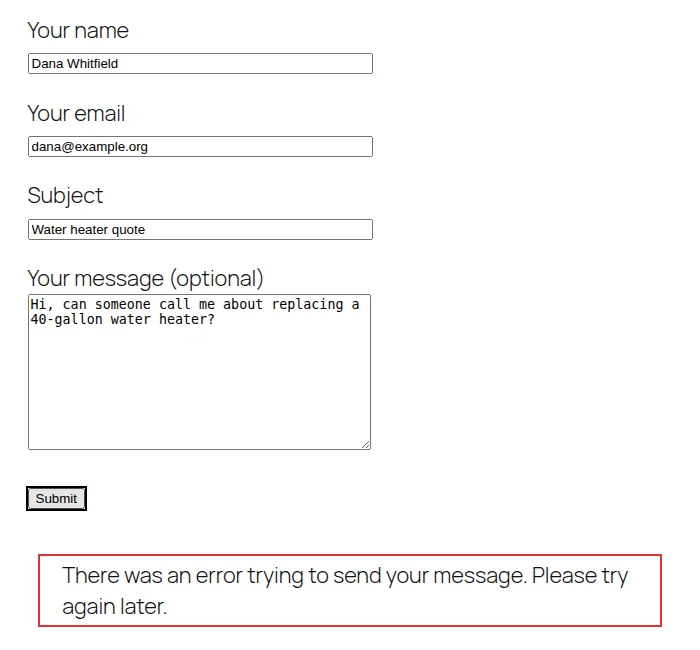
- One surprise: Contact Form 7’s default "There was an error trying to send your message" text is used for both a failed email and a spam verdict, so the same message can mean two different problems.
- Short on time? Hire us today. A Contact Form 7 fix is typically our $129 Plugin Fix Basic.
Start here: match what you see
| What you see | Most likely cause | Go to |
|---|---|---|
| Form says "Thank you… sent" but no email arrives | Email delivery, a wrong To address, or demo mode left on | Fix 1, 2, 3, 6 |
| "There was an error trying to send your message. Please try again later." | The email failed to send, or the message was flagged as spam | Fix 1, 4 |
| The spinner never stops and nothing happens | The background request is blocked, or a script error | Fix 5 |
| "One or more fields have an error" | Validation, reCAPTCHA keys, or a cached page | Fix 6 |
| "Error: Contact form not found." | The shortcode points at a form that no longer exists | Fix 7 |
| It broke right after an update | A plugin conflict or a version requirement | Fix 8 |
First, find out whether the form or your email is failing
Out of the box, Contact Form 7 emails each submission and keeps no copy. Its own documentation says that by default it does not write any user personal data to the database. That means a failed email is a lost lead, and it also makes troubleshooting a guessing game.
Install Flamingo, a free plugin from Contact Form 7’s authors, then send yourself a test message. Flamingo saves every submission to your WordPress database. Here is what we saw when we reproduced the problem on a test site whose email was broken. The visitor sees an error:
But the message was received and saved, in Flamingo’s Inbound Messages screen:
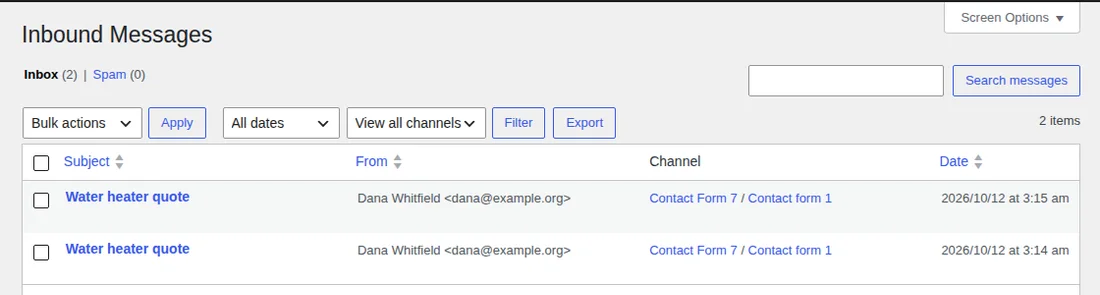
Use that to narrow it down:
- The test message is in Flamingo’s Inbox: the form works and the email is failing. Go to Fix 1
- It is in Flamingo’s Spam tab: Contact Form 7 judged it to be spam. Go to Fix 4
- It is not in Flamingo and the form spins: the submission never reached the server. Go to Fix 5
- It is not in Flamingo and you see field errors: go to Fix 6
Flamingo stores names and email addresses, so mention it in your privacy policy, and delete old messages you do not need. Even if your form is fine today, installing it now means you will never lose an enquiry to a silent email failure again.
Fix 1: Send mail through SMTP instead of your server’s mail function
By default WordPress passes the email to a basic mail function on your web server. That message is unauthenticated, often comes from a shared server address that other sites have already damaged, and many hosts throttle or block it. When it fails, the visitor sees an error. When it "succeeds," the receiving mail provider may still silently discard it.
To see what is really happening, make WordPress write mail failures to its debug log. Add this small snippet as a file at wp-content/mu-plugins/log-mail-failures.php (create the folder if it does not exist), or paste it into a code snippets plugin, with WP_DEBUG_LOG turned on as shown in our debug log guide:
<?php
add_action( 'wp_mail_failed', function ( $error ) {
	error_log( 'wp_mail failed: ' . $error->get_error_message() );
} );
After one failed submission on our test site, wp-content/debug.log contained:
wp_mail failed: Could not instantiate mail function.That message means the server could not hand the email off at all. Your log may show something different, such as an authentication or connection error, and any of them points to the same cure: stop relying on the server’s mail function and send through a proper mail service.
The simplest route is the free WP Mail SMTP plugin. Choose a mailer that matches the email you already have: Google or Microsoft if you use Google Workspace or Microsoft 365, or a transactional email service such as SendGrid, Brevo, Mailgun, Postmark, or Resend. The "Other SMTP" option works with any standard SMTP server. Avoid putting a personal account password into any plugin, and prefer the OAuth sign-in options the Google and Microsoft mailers offer.
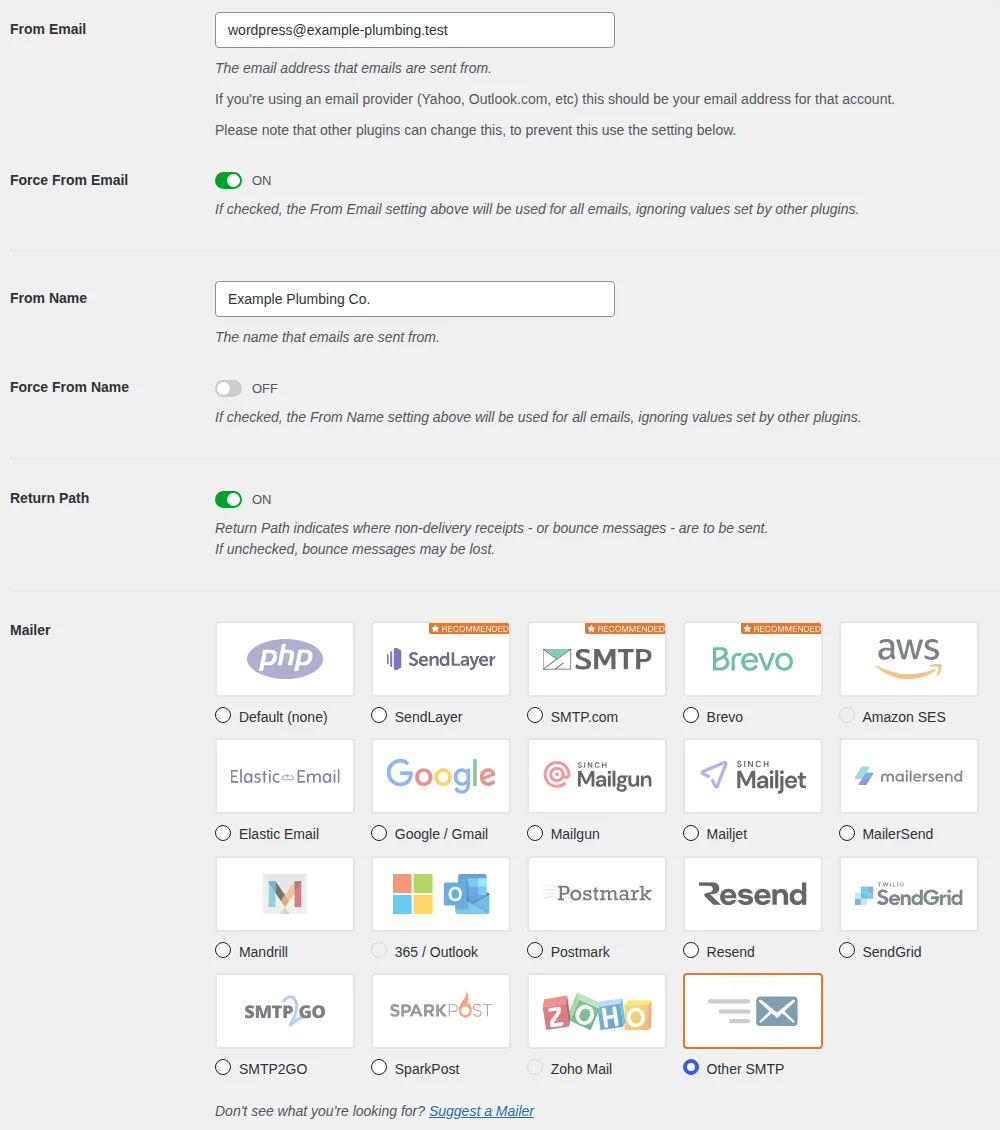
Save, then open WP Mail SMTP → Tools → Email Test and send a test message. When we did, the form went from an error to a success. The same Contact Form 7 form now reads:

Fix 2: Use a From address on your own domain
This is the single most common setting mistake we see. Open Contact → Contact Forms, edit the form, and look at the Mail tab. The From field must be an address on your site’s domain, such as wordpress@yourdomain.com. If you put a Gmail, Yahoo, or Outlook address there, mail providers see a message claiming to be from their domain but sent by your server, which is exactly what spoofing looks like, and they reject it or send it to junk.
Contact Form 7 even warns you about it. This is what we got when we typed a Gmail address into the From field:
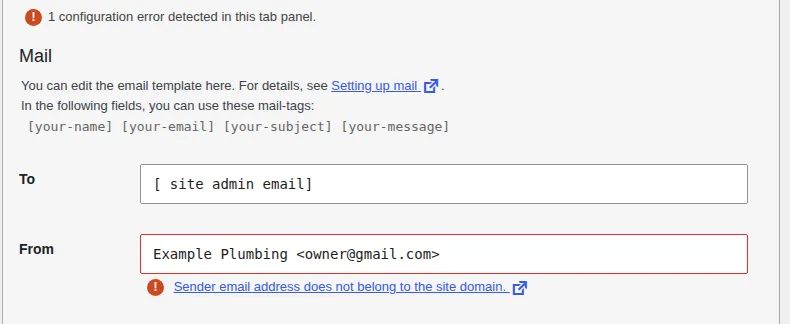
The fix is to use an address on your domain in From, and let the visitor’s address ride in a Reply-To header so you can still reply to them in one click. The default Additional headers field already does this with Reply-To: [your-email]. After the fix the warning is gone:
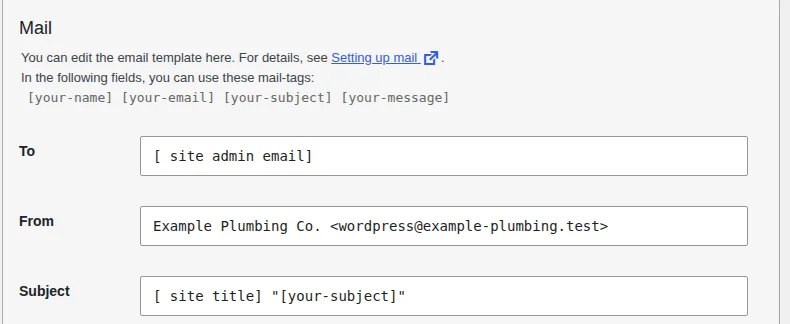
We checked what actually arrives. These are the headers of the email our test site sent after the fix:
From: "Example Plumbing Co." <wordpress@example-plumbing.test>
Reply-To: dana@example.org
Subject: Example Plumbing Co. "Water heater quote"
While you are on the Mail tab, check the To field. The default [_site_admin_email] sends to the Administration Email Address in Settings → General, which may be an old address or a mailbox nobody reads. Put a real inbox in there and test it.
Fix 3: Set up SPF, DKIM, and DMARC for your domain
These three DNS records are how receiving mail servers decide whether to trust a message that claims to come from your domain:
- SPF lists the servers allowed to send mail for your domain
- DKIM adds a digital signature to each message so the receiver can verify it was not altered
- DMARC tells receivers what to do when SPF or DKIM checks fail, and where to send reports
You add them at whoever hosts your domain’s DNS, using values supplied by your email or SMTP provider. Since 2024, Google and Yahoo have required authentication for bulk senders (those sending more than 5,000 messages a day). A small contact form is not a bulk sender, but authenticated mail lands in inboxes far more reliably, so it is worth the ten minutes.
WP Mail SMTP’s test email reports on this. On our fake test domain, which has no DNS records, it flagged the problem straight away:
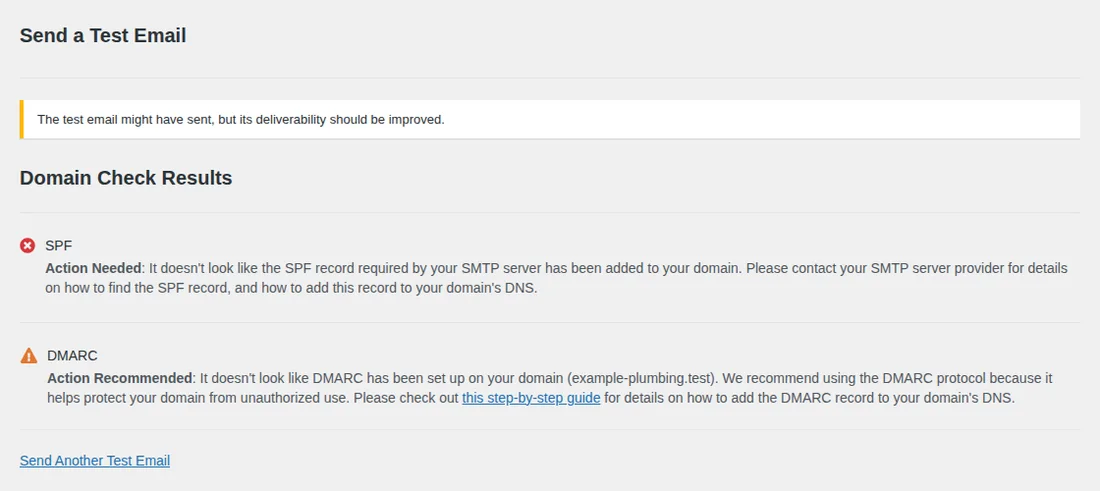
You can also send a test message to a Gmail address, open it, choose Show original from the three-dot menu, and read the SPF, DKIM, and DMARC lines at the top. You want all three to say PASS.
Not sure what you are looking at?
Mail settings, DNS records, and plugin conflicts are not something every business owner should have to debug. We diagnose and fix Contact Form 7 problems every week and tell you the price before we start.
Fix 4: Check whether your message is being treated as spam
Here is the part most guides miss. In Contact Form 7’s source, the default message for a failed email and the default message for a spam verdict are word for word the same: "There was an error trying to send your message. Please try again later." So the red box alone cannot tell you which problem you have.
Contact Form 7 can flag spam through several checks: the Akismet integration, reCAPTCHA or Cloudflare Turnstile scoring, and a check against WordPress’s own disallowed words list (Settings → Discussion → Disallowed Comment Keys). A word you put in that list for blog comments can quietly block legitimate form messages too.
To find out which one you have:
- Look at Flamingo → Inbound Messages → Spam. Flagged messages end up there, as the Flamingo screenshot above shows with its Inbox and Spam tabs
- On the form’s Messages tab, temporarily change the text for "Submission was referred to as spam" to something unique, such as "SPAM VERDICT", and resubmit. If you now see that text, spam filtering is the cause
- Review your Akismet, reCAPTCHA, or Turnstile keys under Contact → Integration, and your disallowed words list
Fix 5: The spinner never stops (a blocked request or a script error)
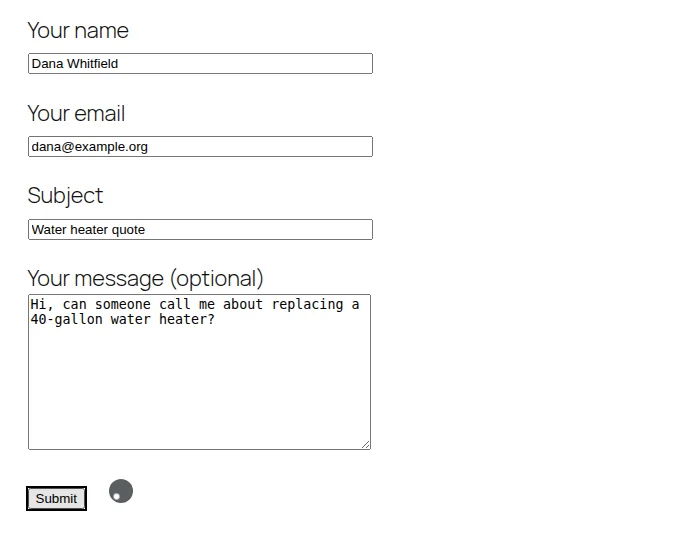
Contact Form 7 does not reload the page when someone clicks Submit. JavaScript sends the data to your site in the background, to an address under /wp-json/contact-form-7/v1/, and shows the answer. If the browser never gets a proper answer, the form just keeps spinning, with no error text at all. We reproduced it by blocking the WordPress REST API for logged-out visitors, which is exactly what some security plugins and "disable REST API" settings do:
Here is how to diagnose it in about a minute:
- Open your contact page, right-click, choose Inspect, and click the Network tab
- Type
feedbackin the filter box and click Submit on the form - Click the request that appears and read its Status
| Status | What it means | What to do |
|---|---|---|
| 200 | The request worked. Read the response for the reason. | Look at the response text. The cause is mail, spam, or a field error (Fixes 1, 4, 6). |
| 401 or 403 | Something refused the request: a security plugin, a firewall rule, or a "disable REST API" setting. | Allow the contact-form-7/v1 route in your security plugin or firewall. Check Cloudflare, Wordfence, and host-level rules. |
| 404 | The REST address does not exist on your site. | Go to Settings → Permalinks and click Save. Check for redirects or a maintenance plugin. |
| 500 | PHP crashed while handling the submission. | Turn on debug.log, resubmit, and read the error (how). |
| 429 or 503 | Rate limiting or a temporary block from a firewall or host. | Check your security plugin or host dashboard for blocked requests. |
You can also test the route directly by opening yourdomain.com/wp-json/contact-form-7/v1/contact-forms/ID/feedback/schema in a browser, replacing ID with your form’s post number. A working site shows a block of JSON. On our blocked test site that address returned:
{"code":"rest_not_logged_in","message":"You are not currently logged in.","data":{"status":401}}If the Network tab shows no request at all, it is a script problem. Click the Console tab and look for red errors. The usual causes are a JavaScript error from another plugin, or an optimization setting (combine, minify, defer, or "delay JavaScript") that breaks the form’s scripts. Exclude Contact Form 7’s scripts from those features, then clear every cache and test again.
Fix 6: The form says it sent, or shows validation errors
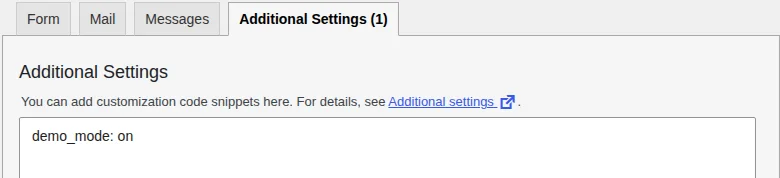
"Thank you for your message. It has been sent." but no email. Open the form’s Additional Settings tab. If you see demo_mode: on or skip_mail: on, the form pretends to work without sending anything. Developers use these while testing, and they are easy to leave behind. We tested it: with demo_mode: on, our form showed the green success message while zero emails went out.
"One or more fields have an error." Check that required fields (marked with an asterisk in the form code) are being filled in, that the field names in the Form tab match the mail tags in the Mail tab, and that your reCAPTCHA or Turnstile keys under Contact → Integration are current. If the page is cached, also make sure your caching plugin is not serving an old copy of the form with stale tokens, and exclude the contact page from page caching if it is.
Fix 7: "Error: Contact form not found."
This message appears on the page where the form should be. It means the shortcode refers to a form that Contact Form 7 cannot find. Current versions identify forms by a short code of letters and numbers, such as [contact-form-7 id="98634da" title="Contact form 1"], instead of a plain number. Contact Form 7 tries the code, then the form’s post number, then the title, and shows the error if none match.

It usually follows a migration or redesign, a deleted form, or a page copied from another site. Open Contact → Contact Forms, edit the form, click Toggle shortcode, copy the current shortcode, and paste it over the old one.
Fix 8: It broke right after an update
Work through the likely suspects in order:
- Check the version requirements. Contact Form 7 6.2.2, current as of October 2026, requires WordPress 7.1 or newer and PHP 8.3 or newer. WordPress refuses to install a plugin update that needs a newer PHP version than your server runs, so an older host can leave you stuck on an outdated release that no longer gets fixes. If that is you, upgrade PHP and WordPress
- Test for a plugin conflict. On a staging copy, deactivate other plugins one at a time and retest the form after each. Caching, security, optimization, and other form plugins are the usual culprits. WordPress.org’s Health Check & Troubleshooting plugin can disable plugins for just your login session, though it has not been updated since 2024, so confirm it works with your version first
- Test with a default theme. Some themes remove or replace Contact Form 7’s scripts or styles. Temporarily switching to a default theme tells you quickly
- If the update crashed the whole site, follow our critical error recovery guide instead
How to test it properly
- Submit the live form using an email address different from your To address
- Check your inbox and spam folder, and Flamingo
- Reply to the message to confirm the Reply-To address is the visitor’s
- Send one more from your phone on mobile data, so you are not testing from your own cached browser
- Repeat after every plugin, theme, or hosting change
Should you replace Contact Form 7?
Not as a troubleshooting step. If email delivery is the problem, a different form plugin will have the same problem, because the cause was never the form. When you delete Contact Form 7 you also lose every form, mail template, and rule you built. Switch only when you genuinely need something it does not offer, such as built-in payments or multi-step forms, and fix delivery first so the replacement works too.
When to get help
If you have worked through these checks and leads are still going missing, bring in someone who does this regularly. A diagnosis usually takes under an hour for a professional, which is far less time and risk than rebuilding every form in a new plugin. Our WordPress Plugin Fix service covers exactly this: we back up your site, find the root cause, and fix it or recommend a safe alternative, and a single Contact Form 7 problem is typically our $129 Plugin Fix Basic. If your whole site is down, use our emergency help instead.
Let us fix it for you
Sparks Motion diagnoses and fixes Contact Form 7 problems safely. We back up your site, find the root cause, and resolve it without breaking anything else.
Frequently asked questions
Why is Contact Form 7 not sending emails?
Almost always because WordPress hands the message to your web server's basic mail function, and the message is rejected, filtered, or never leaves. Fix it by routing mail through an authenticated SMTP service with a plugin such as WP Mail SMTP, using a From address on your own domain, and making sure your domain has SPF, DKIM, and DMARC records. Contact Form 7 itself is rarely the problem.
Why does my form say the message was sent, but no email arrives?
Check three things. First, demo_mode or skip_mail left switched on in the form's Additional Settings tab, which makes the form report success without sending anything. Second, the To address, which may be wrong or point at a mailbox you do not check. Third, spam filtering: the email may have been accepted by your server and then dropped or junked by the receiving mail provider, which is usually a From address, SPF, DKIM, or DMARC problem.
What does "There was an error trying to send your message. Please try again later." mean?
In Contact Form 7 that is the default text for two different outcomes: the email failed to send, and the submission was flagged as spam. The wording is identical on purpose, so you cannot tell them apart from the front end. Check Flamingo's Inbox and Spam tabs, turn on a mail failure log, or give the spam message its own text on the Messages tab while you troubleshoot.
Why does my Contact Form 7 form keep spinning and nothing happens?
Contact Form 7 sends submissions in the background to a REST API address on your site, and the spinner means the browser never got a usable answer. A security plugin, firewall, or "disable REST API" setting blocking that address, or a JavaScript error from another plugin or an optimization setting, are the usual causes. Open your browser's Network tab, submit the form, and look at the status code of the "feedback" request.
Does Contact Form 7 save form submissions?
Not by default. Out of the box it emails the message and keeps no copy, so a failed email means a lost lead. Flamingo, a free plugin from the same authors, saves submissions to your WordPress database so you can see them and spot spam. Because it stores personal information, mention it in your privacy policy.
Which SMTP plugin should I use for Contact Form 7?
We use WP Mail SMTP, which has a free version and supports Google, SendGrid, Brevo, Mailgun, Postmark, Resend, and any standard SMTP server. The better choice is the mail service behind it: use the SMTP details or API from your email provider (Google Workspace, Microsoft 365) or a transactional email service rather than a personal password.
Does Contact Form 7 work with the latest WordPress and PHP?
Version 6.2.2, current as of October 2026, requires WordPress 7.1 or newer and PHP 8.3 or newer. WordPress will refuse to install a plugin update that needs a newer PHP version than your server runs, which leaves you on an older Contact Form 7 that stops getting fixes. If that is you, plan an upgrade of PHP and WordPress.
How much does it cost to have someone fix Contact Form 7?
A single Contact Form 7 problem such as email delivery, a blocked submission, or a plugin conflict is typically our $129 Plugin Fix Basic. Multiple issues or deeper conflicts run higher, and we tell you the price before we start.
How we tested this. Every screenshot and error message in this guide was captured from a real WordPress 7.1.3 test site running Contact Form 7 6.2.2, Flamingo 2.6.4, and WP Mail SMTP 4.10.2, which we broke on purpose in each of the ways described: no working mail transport, a From address on another domain, a blocked REST API, and demo mode left on. Where we describe plugin behaviour (identical default messages for spam and failed mail, shortcode lookup order, demo mode, the disallowed words check), we read it in the plugin’s source code. The business in the screenshots is made up. Last reviewed Oct 12, 2026 on WordPress 7.1.3 and PHP 8.4.